Thursday, October 9, 2014

Class 6, Part 1


I opened up a word document and made a circle using the toolbox, 
to make the circle I pressed shift so I would have a perfect circle.


I changed the background of the color to silver (gray) and used a darker gray color to draw the woman in the dollar coin.


I used text box to write in the year of the coin and used the toolbox to make the stars.
To make the stars look equally, I used copy and paste and duplicated the number of stars.


I aligned the stars using the command key.


This is the finalized version of my silver dollar.

Wednesday, October 8, 2014

Class 5, Assignment 10


This is a screenshot of the beginning of the survey.


Finished up the second section and heading on to the part three.


Finished the survey and have to enter in the code.


This is my identity.

It took me approximately fifteen minutes to do this survey. 
I finished quickly even though I did not rush myself. 
Apparently I should feel disturbed about this but I actually am unaffected.
I know that I check my email once a day, I check facebook once or maybe twice a day, scroll through instagram when I'm on the bus or subway, I use kakao talk (or wechat) to text my friends.
This does not disturb me. I feel that technology has made everything easier.
Instead of getting the latest magazine to look for new styles, people can simply look through instagram and search hashtags, text using a free app instead of using messages that have monthly limits, write journal entries on one's blog with pictures instead of a journal that can get lost. 
So, I guess I want to say is that I am indifferent about my results.


Class 5, Assignment 7


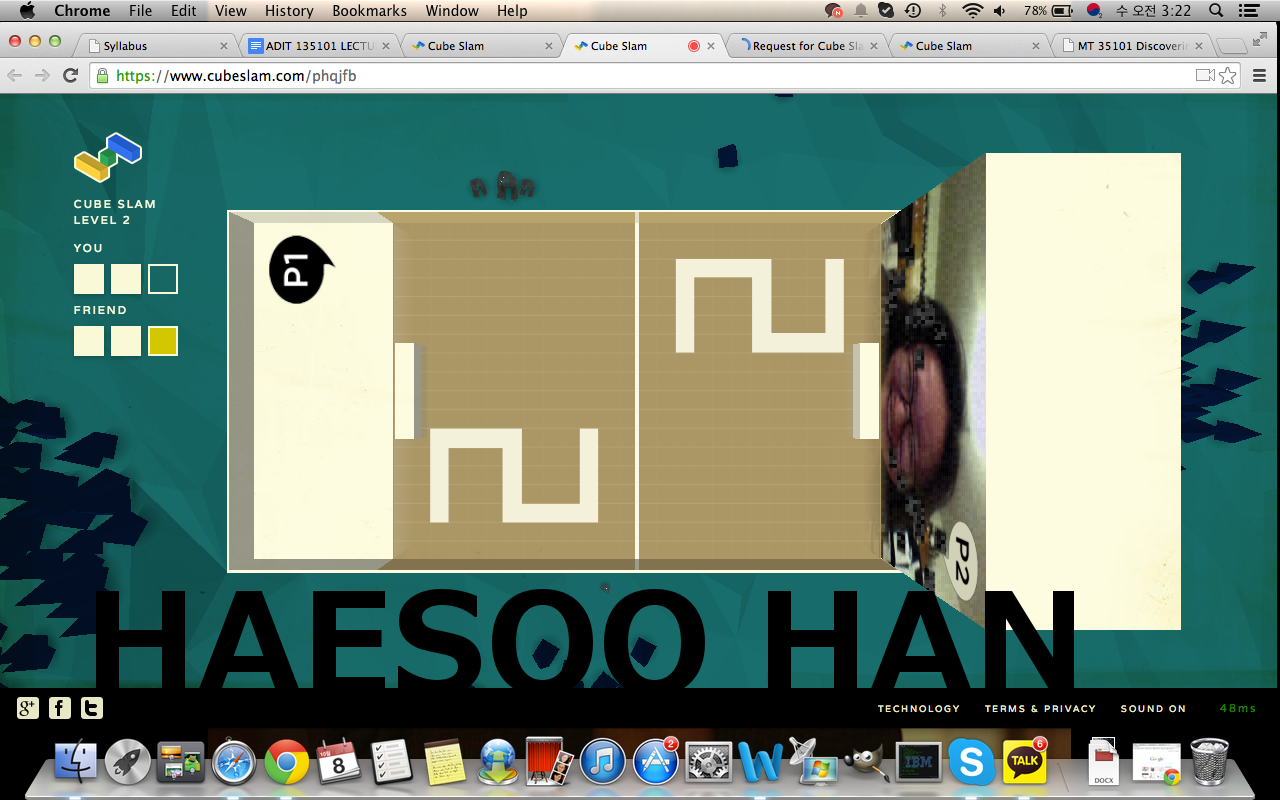
I accepted Jung's invite on email for the game.


We both turned our webcams on and played the game.


I won all three games in the first round, Jung seemed to have struggled.


The second round was tight, we were both up 2-2 and Jung eventually won the second round.


This is a screenshot of the third round.


I lost all three games and lost round three.


We decided to play another round, round four.


I won this round 3:1.


We decided to make round five our final round. 


I won the last round and eventually the score was 3:2
:)

Tuesday, October 7, 2014

Class 5, Assignment 6


I opened a picture of my face on GIMP.


Using the clone tool, I adjust the size of the brush that I wanted to use for cloning my eye.
While pressing the command key (I use mac) I clicked on my right eye and I clicked again on my sweater, which made a copy of the eye I cloned.


Using the same techniques I cloned my left eye and nose.


I adjusted my brush to a larger pixel size and made a clone of my hand.


And using a larger pixel size brush, I also made a clone of my face.


This is the image I exported with my name on the top corner.


Class 5, Assignment 5

This is a post I shared on Google Group


This is my feedback on WonSun's post on photoshop and body image.

This is my feedback on Filipe's post.

Class 5, Assignment 4


I opened a new infographic template to begin the assignment.


I wrote the title on the first canvas, changed the font and size, and changed the background texture.


I scrolled through the Immersion 2014 website and read what the event was about and looked for images online.


On the second canvas I used the images I downloaded.


I also wrote the dates on the second canvas and changed the font size.


On the third canvas, I used images I downloaded as well.


I added some text in the second canvas to show what the event was about.


This is the finalized version of my infographic with my name on the bottom.


MIDTERM #10


I followed the video and drew a triangle for the roof.
This is a midterm exercise from the Immersive Education course that I am taking at Boston College. The course is called Discovering Computer Graphics. For details, visit the immersive BC portal at http://ImmersiveEducation.org/@/bc


Drew a rectangle for the house base.
This is a midterm exercise from the Immersive Education course that I am taking at Boston College. The course is called Discovering Computer Graphics. For details, visit the immersive BC portal at http://ImmersiveEducation.org/@/bc


I opened up the format shape to change the texture of the triangle and rectangle.
This is a midterm exercise from the Immersive Education course that I am taking at Boston College. The course is called Discovering Computer Graphics. For details, visit the immersive BC portal at http://ImmersiveEducation.org/@/bc


This is a screenshot of the texture I changed for the house.
This is a midterm exercise from the Immersive Education course that I am taking at Boston College. The course is called Discovering Computer Graphics. For details, visit the immersive BC portal at http://ImmersiveEducation.org/@/bc


I added two windows, a door with a doorknob, and a sun with my name on it.
I also changed the color of the frame of the house.
This is a midterm exercise from the Immersive Education course that I am taking at Boston College. The course is called Discovering Computer Graphics. For details, visit the immersive BC portal at http://ImmersiveEducation.org/@/bc


I drew some squiggly lines.
This is a midterm exercise from the Immersive Education course that I am taking at Boston College. The course is called Discovering Computer Graphics. For details, visit the immersive BC portal at http://ImmersiveEducation.org/@/bc


I colored in the background to make it seem like the house is on a meadow and the sky is sky blue.
I also added a chimney and smoke coming out of the chimney.
This is a midterm exercise from the Immersive Education course that I am taking at Boston College. The course is called Discovering Computer Graphics. For details, visit the immersive BC portal at http://ImmersiveEducation.org/@/bc


Drew two people: One boy and one girl.
This is a midterm exercise from the Immersive Education course that I am taking at Boston College. The course is called Discovering Computer Graphics. For details, visit the immersive BC portal at http://ImmersiveEducation.org/@/bc


Made the facial expressions and drew a ballon for the boy and girl.
This is a midterm exercise from the Immersive Education course that I am taking at Boston College. The course is called Discovering Computer Graphics. For details, visit the immersive BC portal at http://ImmersiveEducation.org/@/bc


I added a dog running around the meadow.
This is a midterm exercise from the Immersive Education course that I am taking at Boston College. The course is called Discovering Computer Graphics. For details, visit the immersive BC portal at http://ImmersiveEducation.org/@/bc


Lastly, added the ray of light.
This is a midterm exercise from the Immersive Education course that I am taking at Boston College. The course is called Discovering Computer Graphics. For details, visit the immersive BC portal at http://ImmersiveEducation.org/@/bc


This is the completed version of the midterm using Microsoft Word.
This is a midterm exercise from the Immersive Education course that I am taking at Boston College. The course is called Discovering Computer Graphics. For details, visit the immersive BC portal at http://ImmersiveEducation.org/@/bc


Below is a Google dox link